
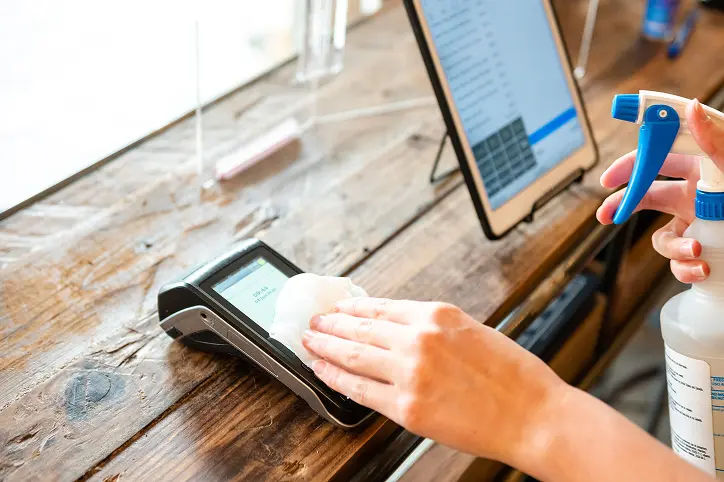
Restaurant technology lives a harder life than most humans. Your iPads and PADs get tapped by servers, handled during rushes, splashed near prep areas, carried across dining rooms, and occasionally treated like they are indestructible bricks from the future.
They are not.
Keeping your PADs clean is important for sanitation, guest experience, device performance, and basic human decency. But cleaning them the wrong way can damage the screen, ports, case, or internal components. So here is the simple Flyght-approved approach to keeping your devices clean without turning them into very expensive paperweights.
Start With the Basics
Before cleaning any PAD, iPad, tablet, or Apple device, unplug it from power. Remove any charging cables, card readers, stands, or attached accessories. If the device is powered on, lock the screen or shut it down if needed.
Use a soft, lint-free cloth. A microfiber cloth is ideal. Do not use paper towels, napkins, kitchen towels, abrasive cloths, or whatever mystery rag is sitting next to the expo printer. Those can scratch screens or leave fibers behind.
Wipe gently. You do not need to scrub the device like it owes you money. Excessive wiping or pressure can damage the screen coating or loosen accessories over time.
What Cleaners Are Safe?
For hard, nonporous surfaces, Apple allows the use of:
70% isopropyl alcohol wipes
75% ethyl alcohol wipes
Clorox Disinfecting Wipes
These can be used to gently wipe the exterior surfaces of the device, including the screen and body.
Do not spray cleaner directly onto the PAD. Spray-and-pray is not a cleaning method; it is how ports get ruined. If you are using a liquid cleaner, apply it lightly to the cloth first, then wipe the device.
Avoid bleach, hydrogen peroxide, aerosol sprays, abrasive cleaners, and anything that sounds like it belongs in a janitor’s closet instead of near electronics.
Avoid Moisture in Openings
This is the big one.
Do not let moisture get into charging ports, speaker holes, headphone jacks, card reader connections, buttons, seams, or any other opening. Liquids and electronics have been enemies since the dawn of time, and the electronics are still losing.
Never submerge the device in any cleaning solution. Never rinse it. Never hold it under running water. Yes, this needs to be said.
Don’t Forget the Case
Flyght installs protective cases on PADs because restaurants are beautiful chaos machines. Those cases should be cleaned regularly too.
Use the same approved cleaning materials listed above for the case, assuming the case is made of hard, nonporous material. Wipe the outside of the case, edges, back, corners, and any areas that are frequently touched. If food debris or grime builds up around the case edges, remove it carefully with a soft cloth.
Do not use harsh chemicals, bleach, or abrasive pads on the case. Do not soak the case while the device is inside it. If the case ever needs a deeper clean, remove the device first and make sure the case is completely dry before reinstalling it.
Build Cleaning Into the Routine
The best cleaning plan is boring and consistent. Wipe PADs at the start or end of each shift, after heavy use, and anytime the device is visibly dirty. Assign ownership by role or station so it does not become one of those “everyone thought someone else was doing it” situations, mankind’s favorite operational failure.
Clean devices last longer, look better in front of guests, and reduce the spread of germs across your team. It is a small habit that protects expensive equipment and keeps your restaurant running smoothly.
Treat your PADs like the business tools they are, not like indestructible coasters with Wi-Fi.
TL;DR Cleaning Checklist
Before cleaning:
☐ Unplug the PAD, iPad, or tablet from power.
☐ Remove charging cables, card readers, stands, and accessories.
☐ Lock the screen or power off the device if needed.
☐ Use only a soft, lint-free microfiber cloth.
Approved cleaning materials:
☐ 70% isopropyl alcohol wipe
☐ 75% ethyl alcohol wipe
☐ Clorox Disinfecting Wipe
Do:
☐ Gently wipe the screen and exterior surfaces.
☐ Clean the protective case with the same approved materials.
☐ Wipe the case edges, back, corners, and high-touch areas.
☐ Let the device and case dry completely before use.
☐ Clean PADs at the start or end of each shift, after heavy use, or anytime they are
visibly dirty.
Do not:
☐ Do not spray cleaner directly onto the device.
☐ Do not use bleach or hydrogen peroxide.
☐ Do not use aerosol sprays or abrasive cleaners.
☐ Do not use paper towels, napkins, rough towels, or abrasive cloths.
☐ Do not let moisture get into ports, buttons, speakers, seams, or openings.
☐ Do not submerge, rinse, or soak the device.
☐ Do not soak the case while the device is inside it.

